RVC (Retrieval-based Voice Conversion) is an open-source, speech-to-speech voice conversion framework that swaps one speaker's voice for another while keeping the original intonation and delivery intact. Unlike cloud text-to-speech tools like ElevenLabs, RVC can be trained and run entirely offline on your own GPU, using as little as 10 minutes of clean audio to build a voice model, with zero API fees, zero usage limits, and zero audio ever leaving your machine.
What Is RVC?
Retrieval-based Voice Conversion (RVC) is an open-source voice conversion algorithm first released in 2023 that performs realistic speech-to-speech transformations. It takes an input voice recording and converts it to sound like a different target speaker, while preserving the original clip's intonation, pacing, and emotional delivery. This is the key distinction from text-to-speech (TTS) systems: RVC doesn't generate speech from text, it converts speech that already exists.
The name comes from its core technique: instead of relying purely on a statistical model to map one voice's features onto another, RVC retrieves the closest-matching speech units from a database built from the target speaker's training audio. That retrieval step is what reduces "tone leakage" — the source speaker's timbre bleeding through into the output — and is the reason RVC-converted voices tend to sound more natural than earlier voice-conversion approaches.
How RVC Works Under the Hood
An RVC pipeline is built from three main components:
- Content feature extractor — a self-supervised model such as HuBERT pulls linguistic/phonetic content out of the source audio, separate from who is speaking it.
- Retrieval module — a vector index built from the target speaker's training data is searched for the closest matching speech units (top-1 retrieval), which is what keeps the converted voice sounding like the target speaker rather than a blend of both.
- Pitch extraction and vocoder — modern RVC builds use the RMVPE algorithm for pitch extraction, which produces cleaner results with fewer artifacts than older pitch trackers, before a neural vocoder synthesizes the final waveform.
The diagram below (from an independent technical breakdown of the RVC codebase) shows the inference-time pipeline end to end:
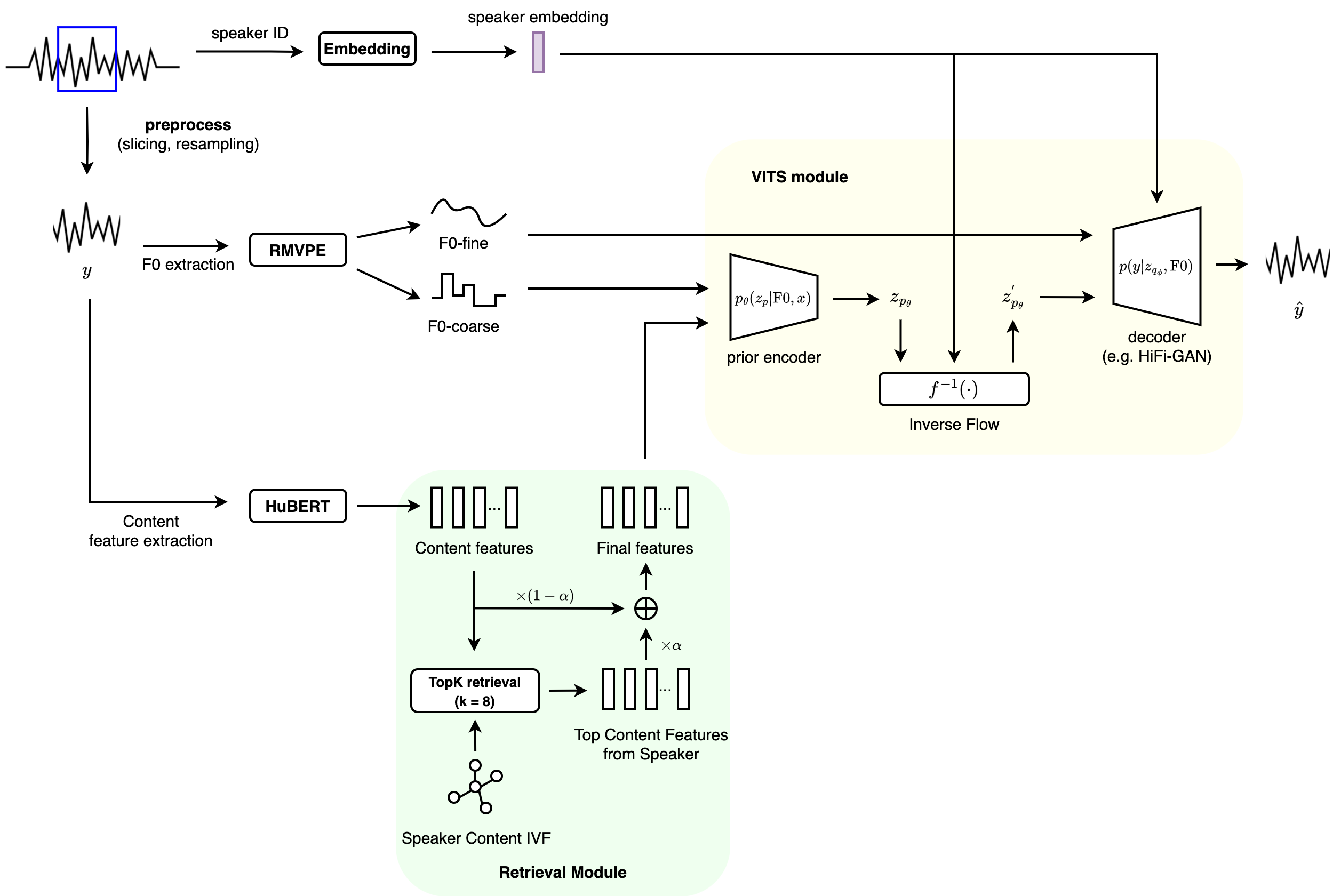
Source: Understanding RVC — Retrieval-based Voice Conversion, gudgud96's Blog
Well-tuned RVC setups report end-to-end latency around 170ms, dropping to about 90ms with ASIO audio drivers — low enough for real-time voice changing while gaming, streaming, or in a video call, not just offline batch conversion.
Why Run RVC 100% Locally Instead of in the Cloud
RVC is MIT-licensed and the reference WebUI, along with every pretrained component it depends on (HuBERT base model, RMVPE, the v1/v2 base checkpoints), is free to download and run on your own hardware. That makes "100% local" the default way most people actually use it, for a few concrete reasons:
- Privacy — training audio and converted output never leave your machine, which matters if you're cloning your own voice for a personal project or working with audio you don't want uploaded to a third-party service.
- Cost — no per-minute or per-character API billing. The only cost is the electricity to run your GPU.
- No rate limits or content filters — cloud voice APIs impose usage caps and moderation; a local model only answers to your own hardware.
- Offline capability — once the models are downloaded, RVC needs no internet connection to train or run inference.
Hardware Requirements
| Use case | Minimum hardware | Recommended |
|---|---|---|
| Training a new voice model | NVIDIA RTX 20-series (2060+), 8GB VRAM | RTX 3060 or newer, 8GB+ VRAM, 10+ minutes of clean source audio |
| Offline inference (batch conversion) | A decent modern CPU, no GPU strictly required | Any NVIDIA/AMD/Intel GPU for faster processing |
| Real-time inference (live voice changer) | ~4GB VRAM GPU | RTX 3060 or better for stable real-time / low-latency performance |
Benchmarks on the RVC pipeline have found that a high-end card like an RTX 4090 isn't even twice as fast as a mid-range RTX 3060 for this workload, so you don't need flagship hardware to get real-time performance — a few-year-old mid-tier GPU is usually enough.
Step-by-Step: Installing and Running RVC Locally
1. Install prerequisites
Install Python 3.12 (x64) and FFmpeg. The official RVC WebUI targets Python 3.12 specifically, and FFmpeg is required for all audio input/output handling.
2. Clone the repository
Clone the official RVC-Project/Retrieval-based-Voice-Conversion-WebUI repo (or the community Applio fork, which wraps the same core pipeline in a more polished Gradio UI with extras like built-in TTS and one-click model uploads).
3. Install the right dependency set for your hardware
The project ships separate requirements files depending on your GPU: a CPU/AMD/Intel build, a CUDA 12.8 build for NVIDIA RTX 50-series cards, and a CUDA 11.8 build for earlier NVIDIA GPUs. Installing the wrong one is the most common source of "it won't detect my GPU" issues.
4. Download the pretrained components
Grab the HuBERT base model, the RMVPE pitch-extraction model, the pretrained v1/v2 base checkpoints, and the training mute samples — these are the shared building blocks every voice model is trained on top of.
5. Launch the WebUI and train a voice model
Start the local Gradio app, feed it 10+ minutes of clean, low-noise speech from your target voice, and start training. Modest consumer GPUs handle this fine; it's not a workload that needs a data-center card.
6. Run inference
Once training finishes, feed any source audio clip (or a live microphone feed, for real-time use) through the trained model to get the converted output — all still running locally, with nothing sent anywhere.
Legal and Ethical Considerations
Running RVC locally doesn't remove the legal and ethical questions around voice cloning — it just means you control the data. As of 2026 there's still no single comprehensive U.S. federal law on AI voice cloning, but the legal landscape has tightened: Tennessee's ELVIS Act (2024) explicitly extends personality rights to AI-generated voice replicas, the EU AI Act imposes a transparency obligation on deepfake-style content, and China requires explicit consent plus labeling for synthesized voice audio. Using someone's voice without their consent — even with a fully local, self-hosted pipeline — can trigger privacy, publicity, or fraud claims depending on jurisdiction and intent. Clone your own voice, or get explicit permission before cloning anyone else's.
FAQ
Is RVC free to use?
Yes. RVC and the official WebUI are open source and free to download and run. There are no subscription fees or API charges when you run it locally — the only cost is your own hardware and electricity.
Do I need a GPU to run RVC?
For offline inference, a decent CPU alone can work, though it's slower. For training a new voice model or for real-time voice conversion, you'll want an NVIDIA GPU with at least 4-8GB of VRAM for acceptable performance.
How much audio do I need to train an RVC voice model?
As little as 10 minutes of clean, low-noise speech from the target speaker is enough to get a usable model, according to the official project documentation.
Is RVC the same as text-to-speech (TTS)?
No. TTS systems generate speech from written text. RVC is speech-to-speech: it takes an existing audio recording and converts the voice in it to sound like a different speaker, while keeping the original timing, intonation, and delivery.
What's the difference between RVC and Applio?
Applio is a community fork of the original RVC project built by the IA Hispano team. It wraps the same core voice-conversion pipeline in a more polished Gradio interface and adds extras like built-in TTS, plugin support, and simpler model management, but the underlying conversion technology is the same RVC approach.
Can RVC run in real time, like a live voice changer?
Yes. With a capable GPU (RTX 3060 or better recommended), RVC can achieve end-to-end latency around 170ms — or as low as 90ms with ASIO audio drivers — which is low enough for live use in games, streams, or voice calls.
Is it legal to clone someone else's voice with RVC?
It depends on consent and jurisdiction. Cloning your own voice, or a voice you have explicit permission to use, is generally fine. Cloning someone else's voice without consent increasingly runs into personality-rights and publicity laws — for example Tennessee's ELVIS Act — regardless of whether the tool runs locally or in the cloud.
Further reading:
- Is My Code Safe with AI Coding Agents? FAQ on Privacy, Security, and IP (2026)
- AI Coding Agent Pricing and Usage Limits FAQ: Claude Code vs Cursor vs Copilot vs Codex (2026)
- Context Engineering: The Core Discipline of AI Engineering in 2026
- CodeGraph and the Best Code Indexing Tools for Faster, More Efficient AI-Assisted Development (2026)