Quick answer: the 10 MCP servers worth setting up for mobile development in 2026 are Figma Dev Mode, the official Dart/Flutter MCP server, iOS Simulator, Android ADB, Callstack's agent-device, GitHub, Supabase, Context7, Sentry, and Codemagic — covering design handoff, framework tooling, device testing on both platforms, source control, backend, live documentation, crash monitoring, and CI/CD. Wire these into Cursor, Claude Code, or any other MCP-compatible agent and it can read your design, write your Flutter/Swift/Kotlin code, drive a real simulator, and ship a build without you copy-pasting context between five different tools.
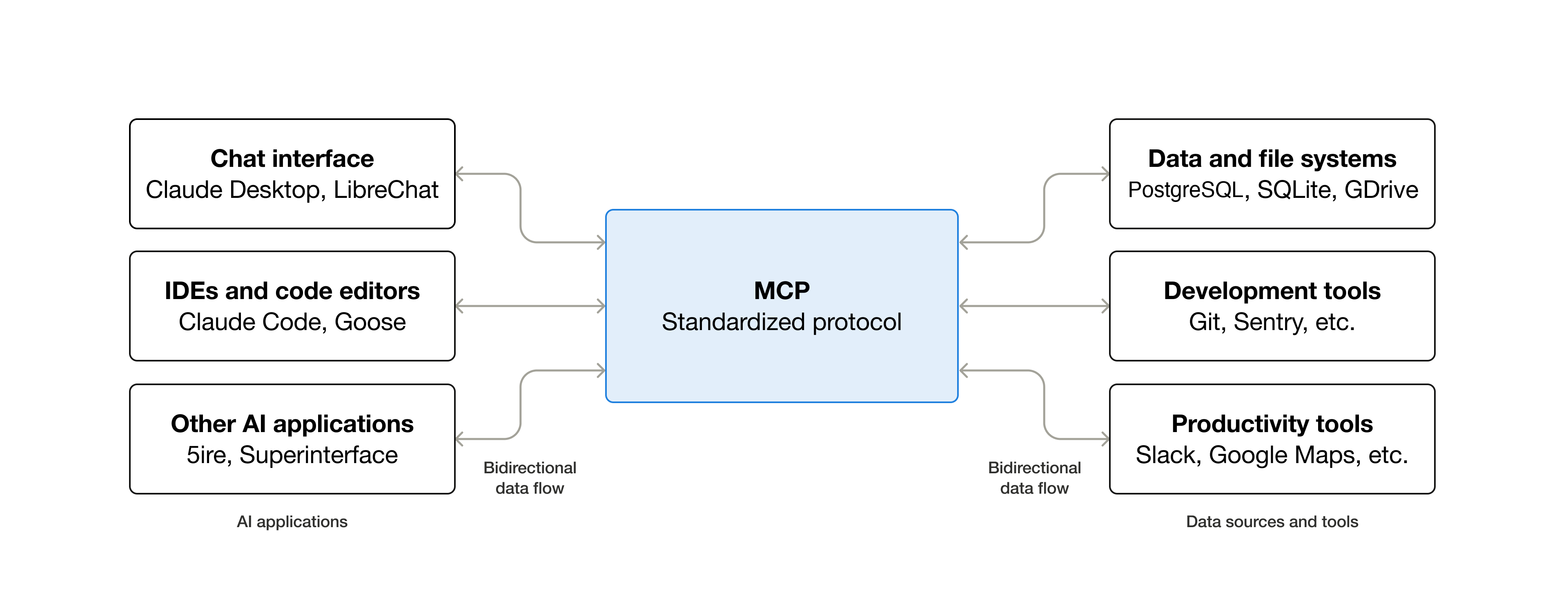
MCP explained simply. Source: modelcontextprotocol.io.
Why MCP matters specifically for mobile developers
Mobile development is unusually tool-fragmented: a design in Figma, framework-specific tooling (Xcode, Android Studio, or the Flutter/Dart CLI), two separate device platforms to test on, a backend, crash reporting, and a CI pipeline just to ship a build. Before MCP, an AI coding agent could only see whatever you manually pasted into the chat. MCP servers give it live, structured access to all of those systems directly — which is exactly why the mobile stack benefits more from MCP than almost any other kind of development.
1. Figma Dev Mode MCP Server — design-to-code context
Exposes your Figma file's real layout data, components, variables, and typography to your agent instead of a flat screenshot it has to guess at. This is the server that makes design-to-Flutter (or design-to-Swift, design-to-Kotlin) workflows genuinely accurate rather than approximate.
Setup: enable the desktop MCP server in Figma's Dev Mode inspect panel, then add its
local URL (http://127.0.0.1:3845/mcp) as an MCP server in your agent's settings.
2. The official Dart/Flutter MCP Server — framework-native tooling
Introduced with Dart SDK 3.9+, this server exposes core Flutter development operations directly to your
agent: package management via pub, static analysis, code formatting, running tests, and
triggering hot reload. Instead of shelling out blind commands, the agent gets structured, framework-aware
feedback on what it just wrote.
3. iOS Simulator MCP — automated iOS testing
Lets an agent launch iOS simulators, interact with a running app, capture screenshots, and inspect UI state. Pair it with a coding agent and you get a tight loop: write the screen, run it, look at it, fix it — without you manually switching windows for every check.
4. Android ADB MCP — automated Android testing
The Android counterpart, driving real devices and emulators through ADB: launching apps, sending input, inspecting UI hierarchy, and managing installed apps. Combined with an iOS Simulator server, this gives an agent parity testing coverage across both major mobile platforms.
5. agent-device (Callstack) — cross-platform semantic testing
A broader automation server built specifically for AI agents: it works across native iOS and Android apps, Expo apps, Flutter apps, React Native apps, and even TV and desktop apps, letting an agent inspect app state, interact with the UI semantically (not just by raw coordinates), capture evidence, debug, profile, and turn one-off explorations into replayable automated checks. It's in production use at teams including Callstack, JPMorgan Chase, Expensify, and Shopify.
6. GitHub MCP — source control and project workflow
Gives an agent direct access to your repos, issues, and pull requests — so it can open a PR for a generated screen, read an existing issue for context on a bug, or check CI status, all without you copying links and diffs back and forth manually.
7. Supabase MCP — natural-language backend access
A very common backend choice for mobile apps; its MCP server lets an agent explore your schema, run queries, and reason about your data model in natural language, which matters a lot when the agent is generating client-side code that needs to match your actual backend shape, not a guessed one.
8. Context7 MCP — always-current documentation
Injects up-to-date library and framework documentation directly into the agent's context at request time, instead of relying on whatever was in the model's training data. Mobile SDKs (Flutter, SwiftUI, Jetpack Compose) ship breaking changes often enough that this alone prevents a meaningful chunk of outdated-API mistakes.
9. Sentry MCP — crash and error context
Pulls real crash reports and error data straight into the agent's context, so instead of describing a bug to it from memory, you can point it at the actual stack trace and device/OS breakdown from production and ask it to fix the root cause.
10. Codemagic MCP — mobile-specific CI/CD
A CI/CD platform built specifically for mobile (iOS, Android, Flutter, React Native), with an MCP server that lets an agent trigger builds, check pipeline status, and manage delivery — closing the loop from "agent wrote the code" to "a build actually shipped" without you leaving the conversation.
Quick-reference comparison
| # | Server | Best for | Connects to |
|---|---|---|---|
| 1 | Figma Dev Mode | Design-to-code accuracy | Figma files, components, tokens |
| 2 | Dart/Flutter (official) | Framework-native dev ops | pub, analyzer, tests, hot reload |
| 3 | iOS Simulator | iOS UI testing loop | Xcode Simulator |
| 4 | Android ADB | Android UI testing loop | Emulators / physical devices |
| 5 | agent-device | Cross-platform semantic testing | iOS, Android, Expo, Flutter, RN, TV |
| 6 | GitHub | Repo, issues, PRs | GitHub |
| 7 | Supabase | Backend/data access | Supabase Postgres backend |
| 8 | Context7 | Current library docs | Live documentation sources |
| 9 | Sentry | Real crash/error context | Sentry error tracking |
| 10 | Codemagic | Build & ship | Codemagic CI/CD |
How to actually set these up in Cursor
Every MCP server here follows the same connection pattern in Cursor: Settings → Cursor Settings → MCP → + Add new global MCP server, then either paste the server's URL (for remote/OAuth servers like GitHub, Supabase, or Sentry) or its local command (for desktop servers like Figma's or a simulator server). You don't need all 10 running at once — start with whichever two or three match your actual stack (for a Flutter app, that's typically Figma, the Dart/Flutter server, and one of the device servers) and add the rest as the workflow demands them.
FAQ
Do I need all 10 of these MCP servers to get value from this?
No. Start with the 2–3 that match your actual stack — for most Flutter developers that's Figma Dev Mode, the official Dart/Flutter server, and one device-testing server — and add the others (Sentry, Codemagic, Context7) as specific needs come up rather than installing everything up front.
Are these MCP servers specific to Cursor, or do they work elsewhere too?
MCP is an open, editor-agnostic standard, so all of these work with any MCP-compatible client — Cursor, Claude Code, Claude.ai, VS Code's Copilot Chat, and others — not just one specific IDE.
Which of these matters most if I only set up one?
For most mobile teams, the Figma Dev Mode server delivers the single biggest jump in output quality, since design-to-code accuracy is usually the weakest link in an AI-assisted mobile workflow.
Is agent-device different from the separate iOS Simulator and Android ADB servers?
Yes — the platform-specific servers are narrower and simpler (just drive that one platform), while agent-device is a broader, purpose-built testing layer across iOS, Android, Expo, Flutter, React Native, and even TV/desktop apps, with semantic UI interaction and replayable checks on top of raw device control.
Do these MCP servers send my code or design data to a third party?
It depends on the server. Desktop servers like Figma's run locally on 127.0.0.1 and don't
route your design data through a third-party host by themselves; remote/OAuth servers like GitHub, Supabase,
or Sentry naturally connect to those services' own hosted infrastructure, since that's where the data already
lives. Review each server's own privacy documentation before connecting anything with sensitive data.
Will adding more MCP servers slow my agent down or confuse it?
Every connected server adds tool definitions to the agent's context, which is real overhead — this is exactly the context engineering tradeoff worth being deliberate about. Connect what you're actually using for the current task rather than leaving every server active all the time.
Further reading: